
Rajasthan SSO ID – SSO Portal, Login & New Registration
The SSO ID Rajasthan is a unified login platform developed by the Government of Rajasthan, allowing users to access multiple government services through a single account. Instead of remembering separate usernames and passwords, users can use one SSO ID to sign in to various online services. This system makes accessing government schemes and digital services easier, faster, and more convenient while reducing the need to manage multiple login credentials.
SSO ID Login
Step-by-step login
Registration
Create your SSO ID
Forgot SSO ID
Recovery methods
e-Mitra
E-Mitra Services
Important: SSO ID registration and login should be completed only through the official Rajasthan Government portal. Always check that the website address is sso.rajasthan.gov.in before entering your credentials.
Rajasthan SSO ID Portal Overview
| Feature | Details |
|---|---|
| Portal Name | Rajasthan Single Sign-On (SSO) Portal |
| Official Website | sso.rajasthan.gov.in |
| Launched By | Department of Information Technology & Communication (DoIT&C), Government of Rajasthan |
| Main Purpose | A single digital identity that allows users to access multiple Rajasthan Government online services through one SSO ID and login. |
| State | Rajasthan |
| SSO ID | A unique user identity used to access supported government applications from the SSO dashboard. |
| SSO Login | Users can access their account through the official SSO Login page using their registered credentials and required verification. |
| Major Services | Government recruitment, scholarships, Jan Aadhaar, e-Mitra, education, health, social welfare, employee services, business services and other e-Governance applications. |
| User Categories | Citizens, students, job seekers, government employees, businesses and other eligible users. |
| Registration | New users can create an account through the official SSO Portal using the registration method available for their category. |
| Dashboard | Provides a centralized dashboard from which users can access supported applications and services. |
| Recruitment Services | Provides access to recruitment-related applications and One-Time Registration (OTR), where applicable. |
| Jan Aadhaar | Supports access to Jan Aadhaar-related services, including eligible profile, E-KYC and update facilities. |
| e-Mitra Integration | Provides access to supported e-Mitra services such as citizen applications, certificates and utility-related services. |
| Accessibility | The SSO ecosystem is available through the official web portal, with mobile access also supported through the Raj SSO application. |
| Cost | SSO account registration is described in the source material as free; individual government services may have their own applicable charges. |
| Language | The portal supports Hindi and English interfaces according to the provided source material. |
| Support | Users can use the official SSO Rajasthan helpdesk/support channels for login, registration and account-related issues. |
SSO ID Login
To access your account, you need your registered SSO ID/username and password. The official SSO ID Login page is available at: SSO Login – Official Rajasthan Portal
How to Complete SSO Login?
Follow these basic steps for SSO Login:
- Visit the official SSO Rajasthan Login page.
- Enter your registered SSO ID or username.
- Enter your password.
- Complete the captcha/security verification shown on the page.
- Click the Login button.
- After successful authentication, your SSO dashboard will open.
Depending on your registration method and the options currently available on the official portal, additional login methods may also be displayed.
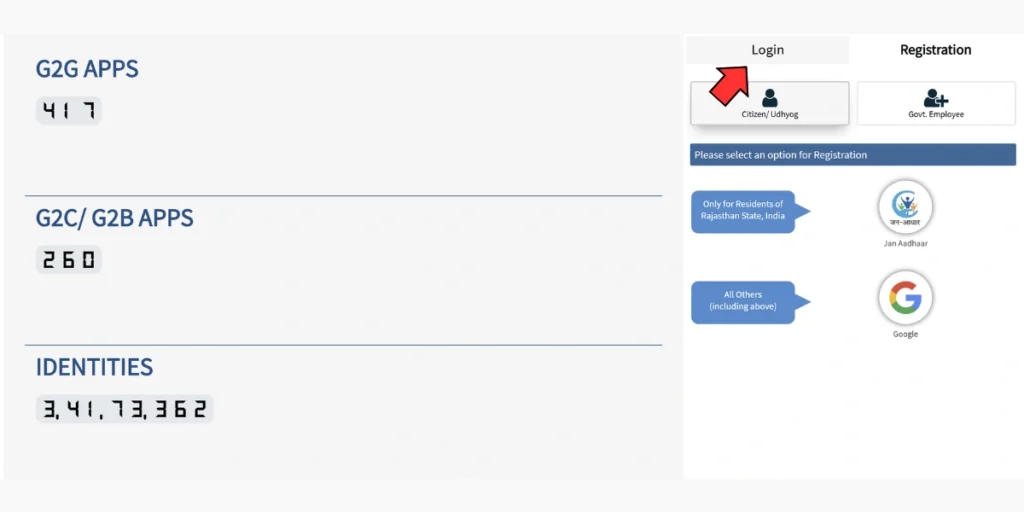
SSO ID Login Problems
If your SSO ID Login is not working, check that your username and password have been entered correctly. You can also use the Forgot SSOID or Forgot Password options available on the official login page.
For security, avoid entering your SSO credentials on public or unknown websites.
What is SSO Rajasthan?
SSO Rajasthan stands for Rajasthan Single Sign-On. It is a digital platform operated by the Government of Rajasthan that brings multiple government applications and citizen services together under a single identity.
With an SSO ID, eligible users can access services related to areas such as:
- Government recruitment
- Scholarships
- Jan Aadhaar
- e-Mitra
- Education
- Health services
- Pension and social welfare
- Land and revenue services
- Transport
- Business and industrial services
- Government employee services
- Online applications and other e-Governance facilities
The exact services available to an individual can depend on their user category and the applications currently integrated with the SSO Portal.
SSO Portal – Services Available
The SSO Portal Rajasthan provides access to a broad range of online government applications.
For Students and Job Seekers
Users can access services related to:
- Recruitment and government job applications
- One-Time Registration (OTR)
- Scholarships
- e-Learning and e-Library
- Academic and education-related services
For Citizens
Common citizen services include:
- e-Mitra services
- Jan Aadhaar
- Grievance-related services
- Health schemes
- Digital documents and certificates
- Utility bill and other online services
For Government Employees
The SSO ecosystem also provides access to applications such as:
- RajKaj
- SIPF
- PayManager
- Attendance-related services
- Government correspondence and employee services
For Businesses
Business users may access services related to:
- Business registration
- GST
- Building plan approvals
- Industrial licences
- Labour-related services
The list of integrated applications can change as new government services are introduced or existing services are updated.
How to Register for SSO ID Rajasthan?
Creating an SSO ID Rajasthan account is an online process. The official registration page is:
Step-by-Step SSO ID Registration
1. Open the Official SSO Portal
Visit the official Rajasthan SSO website and select the Registration option.
2. Select Your User Category
Choose the category applicable to you, such as:
- Citizen
- Udyog
- Government Employee
3. Select a Registration Method
The registration options displayed by the portal can vary according to the selected category. Citizens may be shown options such as Jan Aadhaar, Aadhaar and other supported identity methods.
4. Enter Your Details
Provide the information requested by the portal, such as identity details, mobile number and other required information.
5. Complete OTP Verification
If OTP verification is required, enter the OTP received on your registered mobile number.
6. Create Your SSO ID and Password
Choose an available username/SSO ID and create a strong password.
7. Submit the Registration Form
Review your information carefully and submit the registration form.
Once registration is successfully completed, keep your SSO ID and password secure. You can then use them for SSO ID Login.
Note: Registration methods and required information can change when the official portal is updated. Always follow the instructions displayed on the official SSO Rajasthan website.
Who Can Create an SSO ID?
The SSO Portal supports different categories of users, including Rajasthan citizens, businesses and government employees.
The eligibility and documents required can differ depending on the selected registration category. For this reason, users should check the options and requirements displayed during registration rather than relying on outdated instructions.
Benefits of SSO ID Rajasthan
The main advantage of SSO Rajasthan is that users can access multiple integrated services through one digital identity.
1. One Login for Multiple Services
A single SSO ID can provide access to numerous connected government applications.
2. Saves Time
Users do not need to maintain separate login credentials for every supported service.
3. Centralized Dashboard
Linked applications and services can be accessed from the SSO dashboard.
4. Online Access
Many government-related processes can be initiated or managed online, reducing the need for repeated visits to government offices.
5. Secure Authentication
The portal uses authentication and verification mechanisms to help protect user accounts and information.
Forgot SSO ID or Password?
If you cannot remember your SSO ID, do not create another account immediately. First, use the account recovery options available on the official portal.
For a forgotten password, use the Forgot Password option on the SSO Login page and follow the verification instructions shown there.
If your registered mobile number is no longer available, you may need to use the official support or service-centre process applicable to your situation.
How to Merge Duplicate SSO IDs?
Some users may accidentally create more than one SSO account using different registration methods. Duplicate accounts can create complications when using services linked to your identity.
Before attempting to merge or deactivate an account, carefully identify which SSO ID you want to retain.
A typical account-management process may involve:
- Logging in to the account that needs to be closed or merged.
- Opening the profile/account settings.
- Selecting the relevant account-management or deactivation option.
- Following the merge instructions shown by the portal.
- Completing any required OTP verification.
- Confirming the primary SSO ID.
Important: Portal options can change. Always read the confirmation screen carefully before deactivating or merging an account.
SSO ID and Jan Aadhaar Services?
The SSO Rajasthan platform can be used to access Jan Aadhaar-related services. Depending on the service and current portal requirements, users may be able to perform activities such as:
- Jan Aadhaar E-KYC
- Updating family information
- Updating mobile number
- Updating address
- Updating income information
- Updating bank details
- Checking enrolment/update status
For certain updates, supporting documents and verification may be required.
Jan Aadhaar Update Through SSO
A general workflow is:
- Complete SSO Login.
- Open the Jan Aadhaar service from the dashboard.
- Complete the required E-KYC/verification.
- Select the information that needs to be updated.
- Upload the required documents, if requested.
- Submit the update.
- Complete e-sign/OTP verification where applicable.
- Check the status from the relevant Jan Aadhaar dashboard.
Processing time and documentation requirements may vary according to the type of request.
SSO Rajasthan for Government Recruitment
The SSO Portal is also used to access recruitment-related services. Job seekers can use their SSO account to reach supported recruitment applications and, where applicable, complete One-Time Registration (OTR).
For recruitment applications, always check the latest notification issued by the relevant authority for current:
- Eligibility rules
- OTR requirements
- Fees
- Documents
- Verification requirements
- Application deadlines
Do not rely on an old recruitment guide when applying for a current vacancy.
SSO ID Rajasthan Official Website
The official website for Rajasthan SSO is:
Important pages include:
Always verify the domain before entering your SSO ID, password, OTP or other personal information.
Frequently Asked Questions About SSO ID Rajasthan
-
What is SSO ID Rajasthan?
SSO ID Rajasthan is a single digital identity used to access multiple integrated Rajasthan Government online services through the SSO platform.
-
How can I do SSO Login?
Open the official SSO Rajasthan login page, enter your SSO ID/username and password, complete the required verification and select Login.
-
Where can I create an SSO ID?
You can start SSO ID Registration from the official Rajasthan SSO Portal at sso.rajasthan.gov.in/register.
-
Is SSO ID registration free?
The uploaded source material describes SSO registration as free. However, individual government services or applications may have their own applicable fees.
-
What should I do if I forget my SSO ID?
Use the official Forgot SSOID recovery option instead of creating a duplicate account.
-
Can I access government services using one SSO ID?
Yes. The purpose of the Rajasthan Single Sign-On system is to provide access to multiple integrated government applications through one account.
-
Is SSO Rajasthan available for government employees?
Yes. Government employees have access to relevant employee applications through the SSO ecosystem, subject to the applicable account and service requirements.
-
Is SSO Login available on mobile?
The uploaded material indicates that Rajasthan SSO services can be accessed through the web portal and the Raj SSO mobile application. Availability of specific features may depend on the current app and portal version.